Creating a Dataset in Dataset Explorer
Dataset Explorer lets you create a collection that Corva apps can write to, read from, query, and sometimes subscribe to in real time. The most important decision is the dataset type. Most custom datasets are Time-Based, Depth-Based, or Reference. Some environments also show Time-series as a specialized option.
Choose the type by asking what makes one record different from the next one:
| If records are ordered by... | Choose | Typical examples |
|---|---|---|
| Time | Time-Based | WITS summaries, frac stage measurements, task app outputs with timestamps, app-calculated time series |
| Measured depth | Depth-Based | MWD depth logs, depth-indexed drilling calculations, curves sampled every foot |
| Neither time nor depth | Reference | Lookup tables, user-entered configuration, catalog data, notes, mappings |
| A workflow explicitly requires Time-series | Time-series | Specialized platform or integration workflows that name this dataset type |
Do not choose a dataset type because of a feature you hope to use later. Type should describe the record's natural index. Capabilities such as copying records during reruns, publishing WebSocket events, or generating summaries should be handled as dataset or app configuration when that configuration is available.
Before You Create the Dataset
Write down these four decisions first:
- What is the natural index? Time, measured depth, or neither.
- Is the data asset-specific? If the records belong to a well, rig, or other asset, include
asset_id. - Will apps need live updates? If yes, use a time or depth stream shape and confirm the dataset/app configuration supports WebSocket publication.
- Will reruns need this data? If the data must be copied or maintained with an asset during reruns, capture that requirement as dataset configuration instead of changing the dataset type to work around it.
If you are unsure between two types, use this rule: pick the type that matches how the app will query and append records most often.
Time-Based Datasets
Use a time-based dataset when each record represents a value, event, state, or summary at a timestamp. This is the most common choice for stream apps and scheduled apps that follow time data.
Good use cases:
- A drilling stream app saves calculated values every second or every minute.
- A completion app saves frac measurements by
timestampand optionallystage_number. - A task app stores historical time-series output that a frontend app will plot.
- A frontend app needs to query or subscribe to values over a time range.
- A Dev Center dataset needs to be visualized in the Corva Drilling Traces app.
- An alert needs to evaluate values over time.
Do not use a time-based dataset when the record is fundamentally indexed by measured depth. If the question users ask is "what happened at this depth?", use depth-based.
Required record shape:
{
  "timestamp": 1741786564,
  "company_id": 1,
  "asset_id": 123456,
  "version": 1,
  "provider": "my-company",
  "collection": "company_name#pump-health",
  "data": {
    "pressure": 8421.3,
    "rate": 74.2,
    "state": "Pumping"
  }
}
Common optional fields:
{
  "metadata": {
    "pressure_unit": "psi",
    "rate_unit": "bpm"
  },
  "app_key": "my-company.pump-health",
  "app_version": 3,
  "stage_number": 28
}
Example Dataset Explorer query:
{
  "timestamp": { "$gte": 1741786564 },
  "data.state": { "$in": ["Rotary Drilling", "Slide Drilling"] }
}
Depth-Based Datasets
Use a depth-based dataset when each record represents a value at a measured depth. Depth-based datasets are usually produced by backend apps that follow depth streams.
Good use cases:
- A drilling stream depth app follows
Log Type: Depth. - A scheduled depth app calculates values for a depth interval.
- A frontend app plots values against measured depth instead of time.
- Multiple depth logs exist on the same asset and records must stay scoped to the correct log.
Do not use a depth-based dataset for time-series data just because the asset is a well. If records arrive every second, every minute, or by event time, use time-based.
Required record shape:
{
  "measured_depth": 6025,
  "log_identifier": "751a6e120a86",
  "company_id": 1,
  "asset_id": 123456,
  "version": 1,
  "provider": "my-company",
  "collection": "company_name#formation-quality",
  "data": {
    "gamma_ray": 82.4,
    "rop": 127.5
  }
}
log_identifier identifies the depth stream that produced the data. A single well can have multiple depth streams, such as MWD formation evaluation, MWD mechanical, mud properties, gas data, or drilling depth data.
Common optional fields:
{
  "metadata": {
    "gamma_ray_unit": "gAPI",
    "rop_unit": "ft/hr"
  },
  "app_key": "my-company.formation-quality",
  "app_version": 2
}
Example Dataset Explorer query:
{
  "log_identifier": "751a6e120a86",
  "measured_depth": { "$gte": 6025 }
}
Reference Datasets
Use a reference dataset when records are not naturally ordered by time or measured depth. Think of a reference dataset like a lookup table or a durable set of business records.
Good use cases:
- User-entered configuration for an app.
- A mapping between external IDs and Corva IDs.
- A list of allowed thresholds, labels, tools, or categories.
- Notes or handover records that are searched by fields in
data.
Do not use a reference dataset for stream or depth data. Reference datasets are also not the right choice if you need Corva's custom WebSocket subscription flow for live time/depth updates.
Required record shape:
{
  "company_id": 1,
  "version": 1,
  "provider": "my-company",
  "collection": "company_name#activity-labels",
  "data": {
    "activity_code": "SLIDE",
    "display_name": "Slide Drilling",
    "color": "#4D8CFF"
  }
}
Reference records can include asset_id, timestamp, measured_depth, metadata, app_key, or app_version when those fields are useful, but adding those fields does not make the dataset time-based or depth-based. If the records will mainly be queried by timestamp or measured_depth, choose the matching dataset type instead.
Example Dataset Explorer query:
{
  "data.display_name": { "$in": ["Slide Drilling", "Rotary Drilling"] }
}
What About Time-Series?
Dataset Explorer may show Time-series as a fourth dataset type. Do not treat it as another name for Time-Based.
For normal custom app data that has a timestamp, choose Time-Based. Choose Time-series only when the product workflow, platform team, or template you are following explicitly requires the Time-series dataset type.
Examples:
| Situation | Choose |
|---|---|
| A backend app saves calculated values every minute | Time-Based |
| A frontend app plots custom records over a time range | Time-Based |
| A workflow or template specifically says to create a Time-series dataset | Time-series |
| You want min, max, average, or median summaries | Not a type decision; handle this as summary configuration when available |
| You want records copied during reruns or WebSocket events published | Not a type decision; handle this as dataset/app configuration when available |
If the only reason you are considering Time-series is "the data changes over time", use Time-Based.
Dataset Capabilities Are Separate From Dataset Type
Dataset type answers one question: what indexes the records?
Other behavior should be considered separately:
| Capability | What to decide |
|---|---|
| Rerun behavior | Should records be copied, recreated, or preserved when an asset is rerun? |
| WebSocket events | Should new or updated records publish live events to frontend subscribers? |
| Summary values | Should simple summaries such as min, max, average, or median be generated from this dataset? |
| Asset lifecycle | Should records move with an asset, be deleted with an asset, or remain as company-level reference data? |
When these capabilities are available in the dataset or app configuration, configure them there. Do not create the wrong dataset type to get a lifecycle behavior, a subscription behavior, or a summary behavior.
Create the Dataset
- Open Dev Center.
- Select Dataset Explorer in the top navigation.
- Select the dataset type: Time-Based, Depth-Based, Reference, or Time-series if a workflow explicitly requires it.
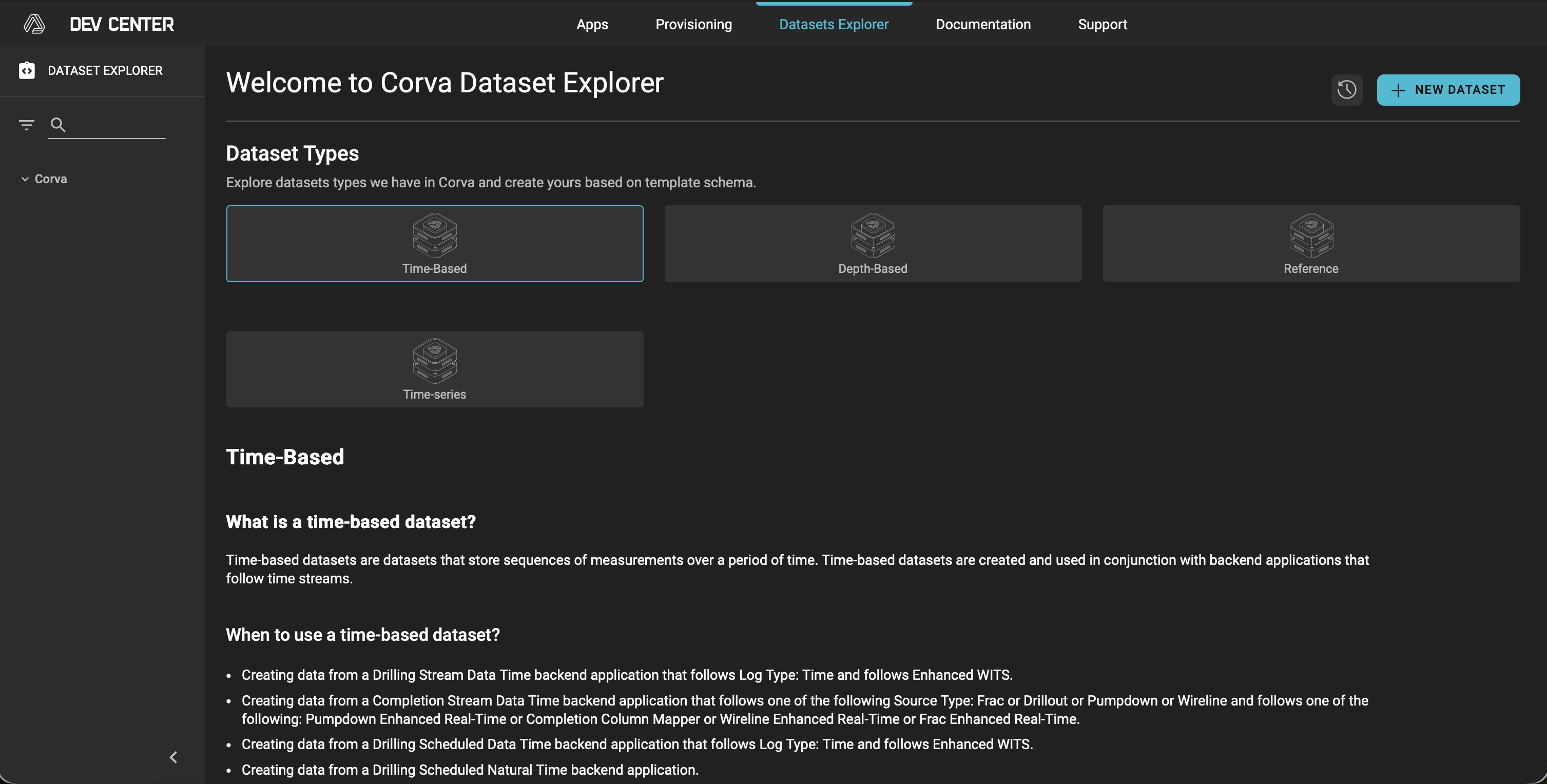
- Click + NEW DATASET.
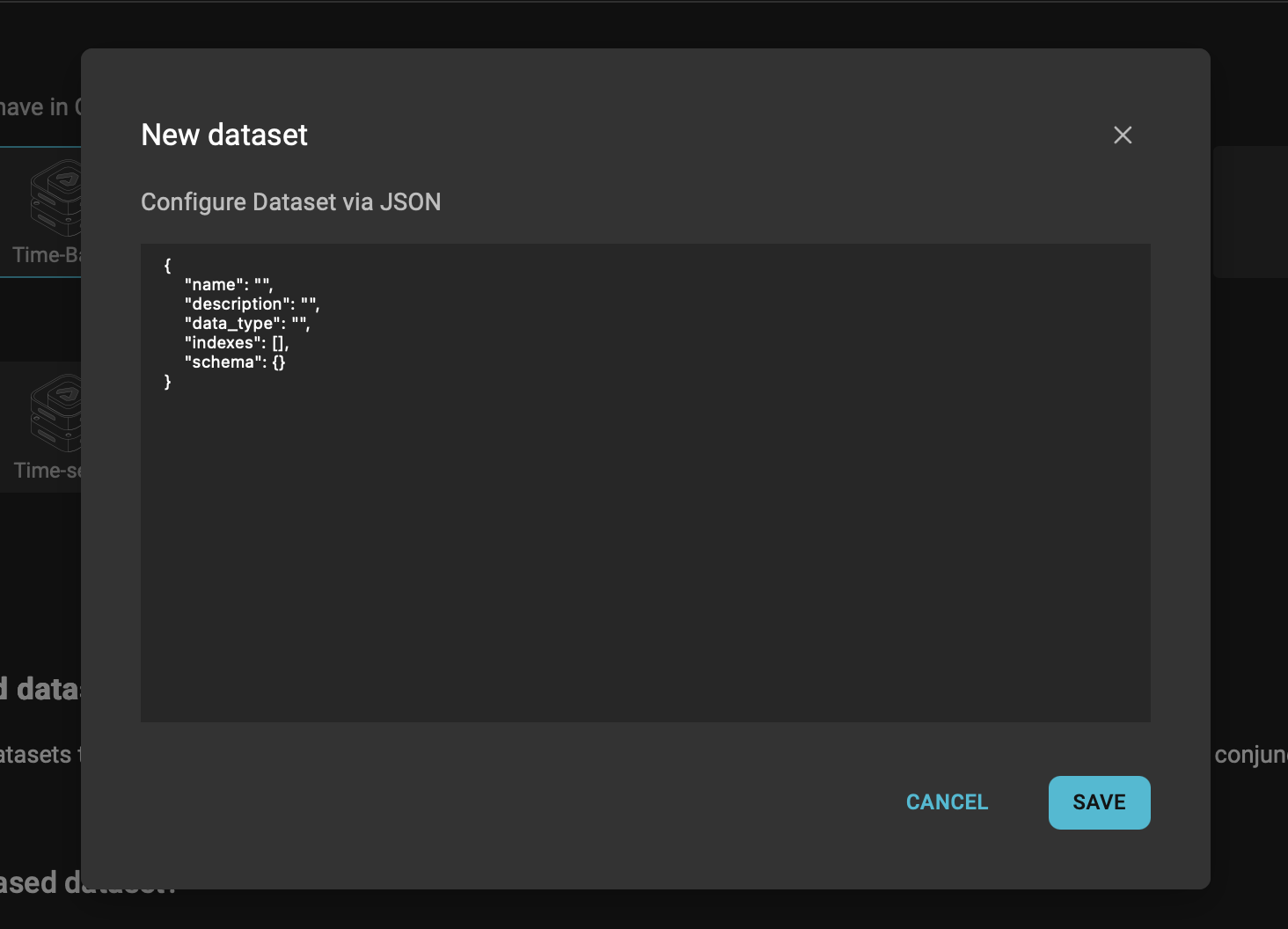
- Fill in only the dataset fields you need for creation:
{
  "name": "company_name#pump-health",
  "description": "Calculated pump health values by timestamp",
  "data_type": "time",
  "indexes": [],
  "schema": {}
}
Use a clear name because it becomes the collection key used by apps and API requests. Dataset names must start with the company prefix followed by #:
company_name#short-purpose-name
Examples:
company_name#pump-healthcompany_name#formation-qualitycompany_name#activity-labels
- Leave
indexesandschemaempty unless you have a specific schema/index requirement and understand how it will affect writes and queries. - Click Save.
Quick Choice Examples
| Scenario | Correct type | Why |
|---|---|---|
| Save WITS-derived values every minute | Time-Based | Records are appended by timestamp. |
| Save gamma ray every foot | Depth-Based | Records are appended by measured_depth and scoped by log_identifier. |
| Store app threshold settings | Reference | The records are configuration, not a time/depth series. |
| Store frac stage metrics over time | Time-Based | The primary index is timestamp; stage_number is additional context. |
| Store a lookup table of activity names and colors | Reference | Users query by fields such as data.activity_code. |
| Store calculated values for a depth interval | Depth-Based | The values belong to a measured-depth range. |
| Follow a template that explicitly requires Time-series | Time-series | The workflow names that dataset type directly. |
Common Mistakes
- Using Reference for asset data that changes over time. Use time-based if users will query by time range, plot historical values, or subscribe to live updates.
- Using Time-Based for depth curves. Use depth-based when the same timestamp can contain multiple depth readings or when depth is the natural axis.
- Ignoring
log_identifieron depth data. Without it, records from different depth streams on the same asset can be mixed together. - Using Time-series just because the data has timestamps. Most timestamped custom app data should be Time-Based unless a workflow specifically requires Time-series.
- Putting units inside field names. Prefer
metadatafor units so field names stay stable. - Changing dataset type to solve rerun or WebSocket behavior. Treat those as capabilities/configuration requirements.
- Choosing a vague collection name. A name like
company_name#databecomes hard to maintain once multiple apps use it.
Final Check
Before saving, make sure this sentence is true:
This dataset is Time-Based / Depth-Based / Reference / Time-series because each record is naturally identified by timestamp / measured depth / business key / an explicit Time-series workflow requirement.
If that sentence is awkward, the dataset type probably needs another look before records are written.